Measurement features
Photos and notes
Attach photos and written notes to any profile to capture client preferences, fabric references, and special requests.
One of the biggest benefits of being able to add photos and notes to your clients’ measurements is that it lets you create a more detailed and accurate record of their measurements.
You can add photos of your client and attach them to their measurement or save photos of their preferred clothing references. This can be especially helpful if you have multiple clients.
In addition to photos, the ability to add notes to your clients’ measurements can also be a valuable tool. You can use notes to record any special requests or preferences your clients have, such as the type of fabric or style of clothing they prefer. This information can help ensure that your clients are happy with the finished product and can help you build stronger relationships with your clients by showing that you are paying attention to their needs and preferences.
How to use the notes and photos feature
The interface is simple and straightforward. These features are only available to Tailor Shop subscribers. Follow these steps.
How to add photos
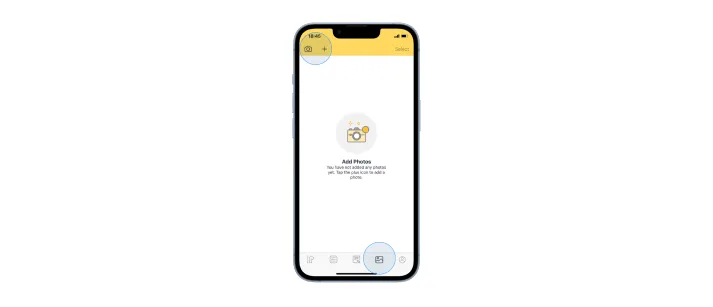
- Open the app.
- Select the profile to which you want to add photos.
- Tap the fourth icon at the bottom left. This will open up the photos page.
- On the photo page, tap the ”+” icon in the top-left corner of the app. This lets you add photos from your device gallery.
- The camera icon beside the ”+” icon lets you take a live picture of anything you want.
How to delete photos
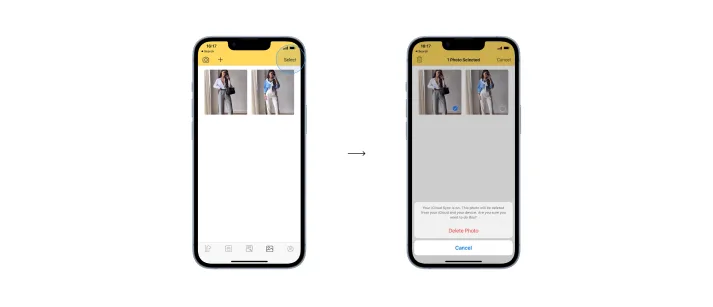
- Still on the photos page, tap the “select” button on the top-right corner of the page.
- Select the image(s) you want to delete.
- Then tap the delete button on the top-left corner of the app.
How to add notes
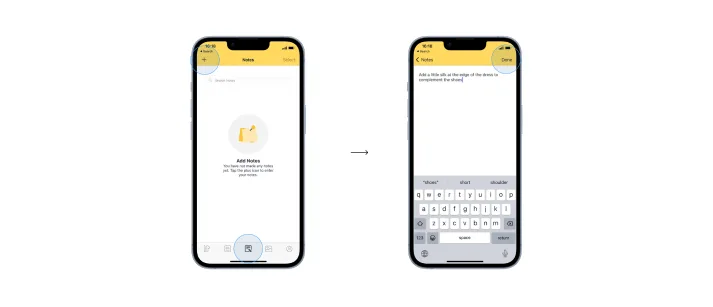
- Open the app.
- Select the profile to which you want to add notes.
- Tap the middle icon at the bottom.
- Then tap the ”+” icon in the top-right corner of the app.
- This creates a new page for you to add your notes. Add your notes and tap done when you are finished.
- You can also search through your notes by typing in any word in the search bar located at the top of the page.
How to delete notes
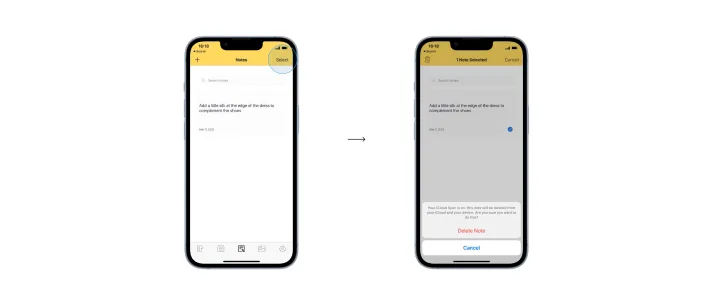
- Still on the notes page, tap the “select” button on the top-right corner of the page.
- Select the note(s) you want to delete.
- Then tap the delete button on the top-left corner of the app.
In summary, the photos and notes features of Dress Measurement help you create a more detailed and accurate record of your clients’ measurements, which can help you provide better services and build stronger relationships with your clients over time.